
Knowledge Gaps
Review questions that need better source material or human follow-up.
A knowledge gap is a question answerLoops received but could not answer well, which usually means your knowledge base is missing something. The Knowledge Gaps page collects them in one place and ranks the most-asked first, so you always know which article to write next. Open it from the Improve group in the sidebar.
Knowledge Gaps needs the Pro plan or above. Self-hosted deployments have every feature unlocked.
What counts as a gap
A ticket shows up here when it matches one of the rules below and no knowledge base article has been linked to it. Tickets marked as duplicates are left out. Each gap is tagged with one of three reasons:
| Reason | What happened | Rule |
|---|---|---|
| Needs human | The ticket was routed to a person. The AI flagged the question as needing a human (for example account-specific, billing, or policy questions), or it is a bug report or feature request. | The ticket's AI draft status is needs_human |
| Low AI confidence | The AI searched the knowledge base but was not confident enough in any result, and did not answer automatically. | Confidence score below 0.6 |
| Missing KB article | A how-to or documentation question was resolved or closed by a person, but no article covers the topic, so the next person with the same question gets the same poor result. | Resolved or closed how_to or documentation ticket with no linked article |
A ticket that fits more than one reason is shown under the first that applies, in the order above.
Read the page
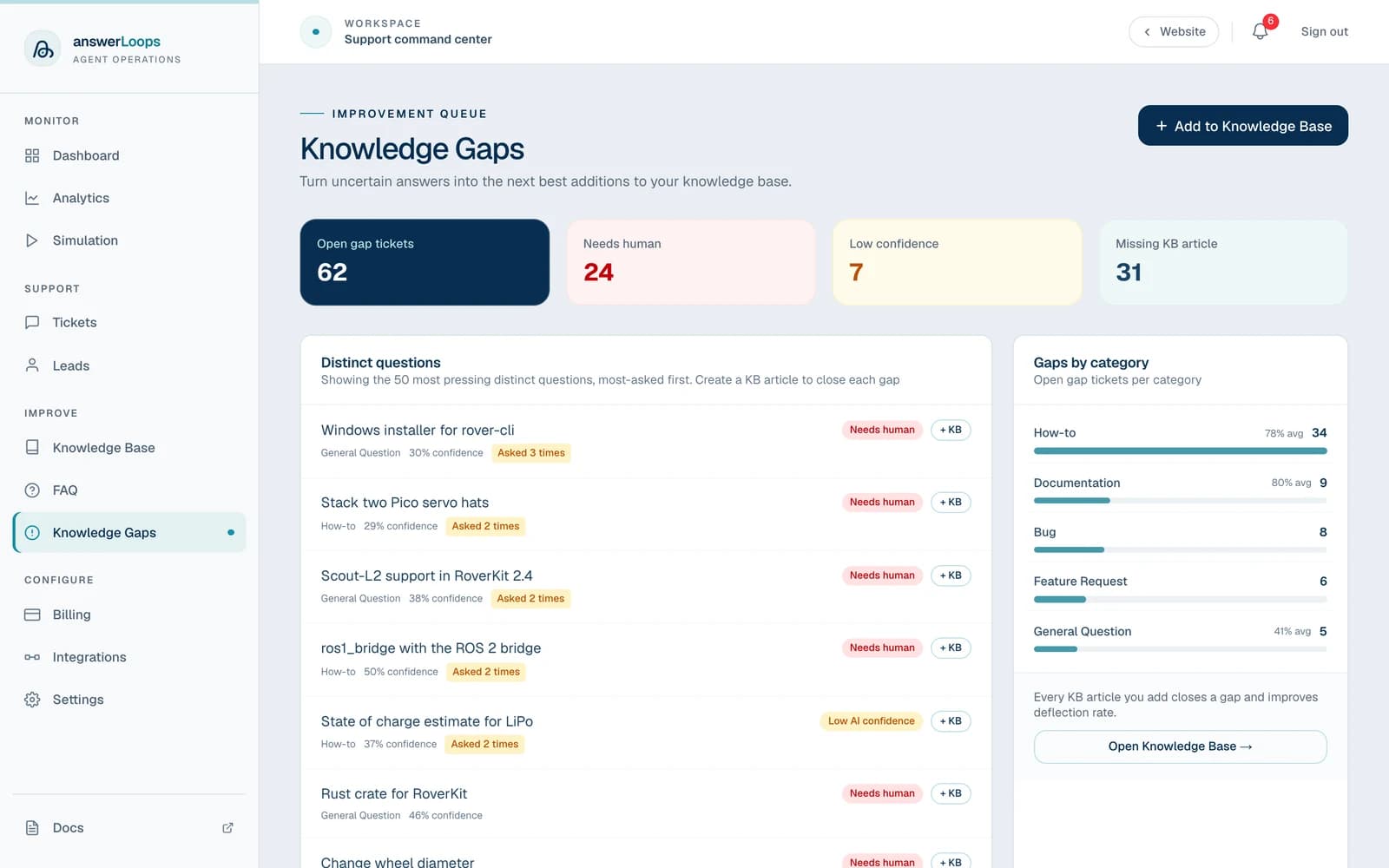
The page opens with four cards: Open gap tickets, Needs human, Low confidence, and Missing KB article. They count tickets across all channels, however many there are, and each ticket counts once, so a question asked several times counts once per ticket.
Below them, Distinct questions lists the most pressing questions, most-asked first, up to 50 rows. When several tickets ask the same question, they appear as one row with an Asked N times badge, and the row links to the ticket that most needs an article: the one with the lowest AI confidence. Each row shows:
- The question, linking to the ticket
- The category, and the confidence percentage when the AI recorded one
- The reason badge (Low AI confidence, Needs human, or Missing KB article)
- A + KB button that opens the Knowledge Base with the ticket's question and answer filled into the Write an answer by hand form (owners and admins)
On the right, Gaps by category counts open gap tickets per topic, the same way as the cards, so the two always agree. Clusters stand out: if 12 gaps are all about your API authentication flow, that is the highest-value content to write next.
Two tickets count as the same question when their meaning is very close, using the same similarity test answerLoops uses to flag duplicate tickets. Tickets that have not been embedded yet, or were embedded with a model you have since moved off, are not merged and show as their own rows.
Gaps are about tickets that were already handled. To turn unseen questions, from tickets and from the website widget, into articles before anyone has to resolve them by hand, use the Review queue on the Knowledge Base page.
Close a gap
Open Knowledge Gaps and start with the rows marked Asked N times, or with the category that has the most open tickets.
Click the question to open the ticket. Read what was asked and, if a person resolved it, how.
Click + KB on the row. The Knowledge Base opens with the ticket's summary as the question and its resolution notes (or the AI's draft) as the answer, filled into Write an answer by hand. Edit the text and click Add to knowledge base. The article is linked to the ticket, which closes the gap, and it can answer the next question straight away. Owners and admins can add articles.
Open the Knowledge coverage tab, type a representative question into Try a customer question, and confirm the new article is the one the assistant would draw on.
You can also close a gap from a resolved ticket with Promote to KB, which turns the person's resolution into an article in one click. Writing by hand and promoting share the same limit of 30 adds every 10 minutes and the same 2,000-article cap. A file upload or URL import adds knowledge too, but it is not linked to a ticket, so the original gap stays listed.
Adding content does not guarantee that every related question will now qualify for an automatic reply. Check that the answer uses the intended source and addresses the original problem.