
Human escalation
Configure who should follow up when a question needs a person.
Not every question should be answered by AI. When the reviewer is not confident enough, or the question is a bug report or feature request, the ticket is handed to your team. Escalation is the step that makes sure a specific person or group notices.
Human escalation routing is available on Pro and Enterprise, and in the self-hosted edition. On other plans, questions that need a person still wait for your team in the ticket queue; they just do not tag anyone.
What escalation does
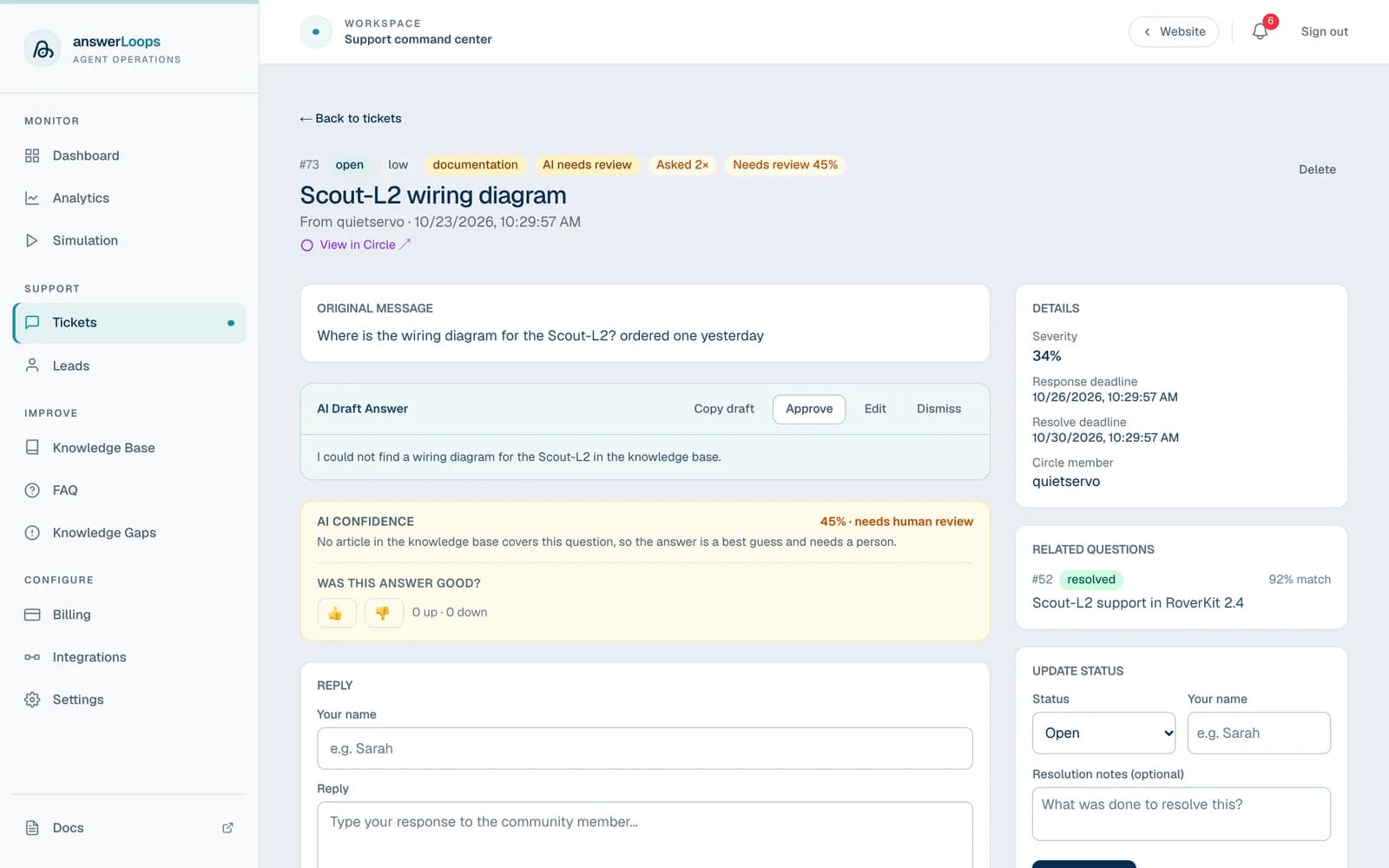
When a ticket needs a person, answerLoops posts a short acknowledgment in the channel ("a team member will follow up shortly") and mentions your escalation contact in it. The unreviewed AI draft is never posted publicly. It stays on the ticket for you to approve or rewrite, and a notification appears in your workspace.
A ticket needs a person when any of these is true:
- The reviewer's confidence is below the channel's confidence threshold, or it judged that the draft does not fully answer the question.
- The question is a bug report or feature request with no matching earlier ticket or workaround.
- Automatic Deflections is on, but your plan's monthly allowance of automatic answers is used up.
The channel mention is part of the automatic reply, so it only appears when Automatic Deflections is on for that channel. When it is off, neither an answer nor a mention is posted to the channel. The draft and the in-app notification are still created, so check the ticket queue. See Automatic replies.
Choose who gets notified
Open Settings and select the connected channel.
Edit the channel's configuration and fill in the escalation field. The field depends on the platform:
| Platform | Field | What to enter |
|---|---|---|
| Discord | Escalation Role ID | The ID of the role to mention |
| Slack | Escalation User Group ID | A user group ID, which starts with S, or a single user ID, which starts with U |
| Telegram | Escalation username | A username to mention |
| Escalation email | The address named in the reply as the person who will follow up | |
| Discourse | Escalation user | A username to mention |
| Google Chat | Escalation user id | A user in the form users/12345 |
The field is optional. Leave it empty to skip the mention.
Send a question the knowledge base cannot answer, with Automatic Deflections on. Confirm that the ticket appears and the intended person or group is mentioned.
Each integration's setup guide explains where to find these identifiers and which permissions the bot needs.
Handle the ticket
Read the question, the draft, and the confidence explanation.
Approve or edit the draft, or write your own reply.
Move the ticket to in_progress, resolved, or closed.
Promote the resolution into the knowledge base only when it is useful beyond this one request. If the AI struggled because documentation was missing or out of date, fix the knowledge base instead of lowering the threshold.
Raising the confidence threshold sends more questions to a person. Lowering it lets more drafts post automatically, but it does not improve the evidence behind them.