
AI Model
Configure chat and embedding providers, test connections, and see your included AI usage.
answerLoops uses two kinds of AI model. A chat model reads a question and drafts the answer. An embedding model turns your knowledge base into a searchable index so the right articles can be found. Settings → AI Model controls which provider and models your workspace uses. Owners and admins can change it.
On a hosted plan you do not have to set anything up: AI usage is included. Add your own provider when you want to choose the models yourself, or remove the included-usage limit.
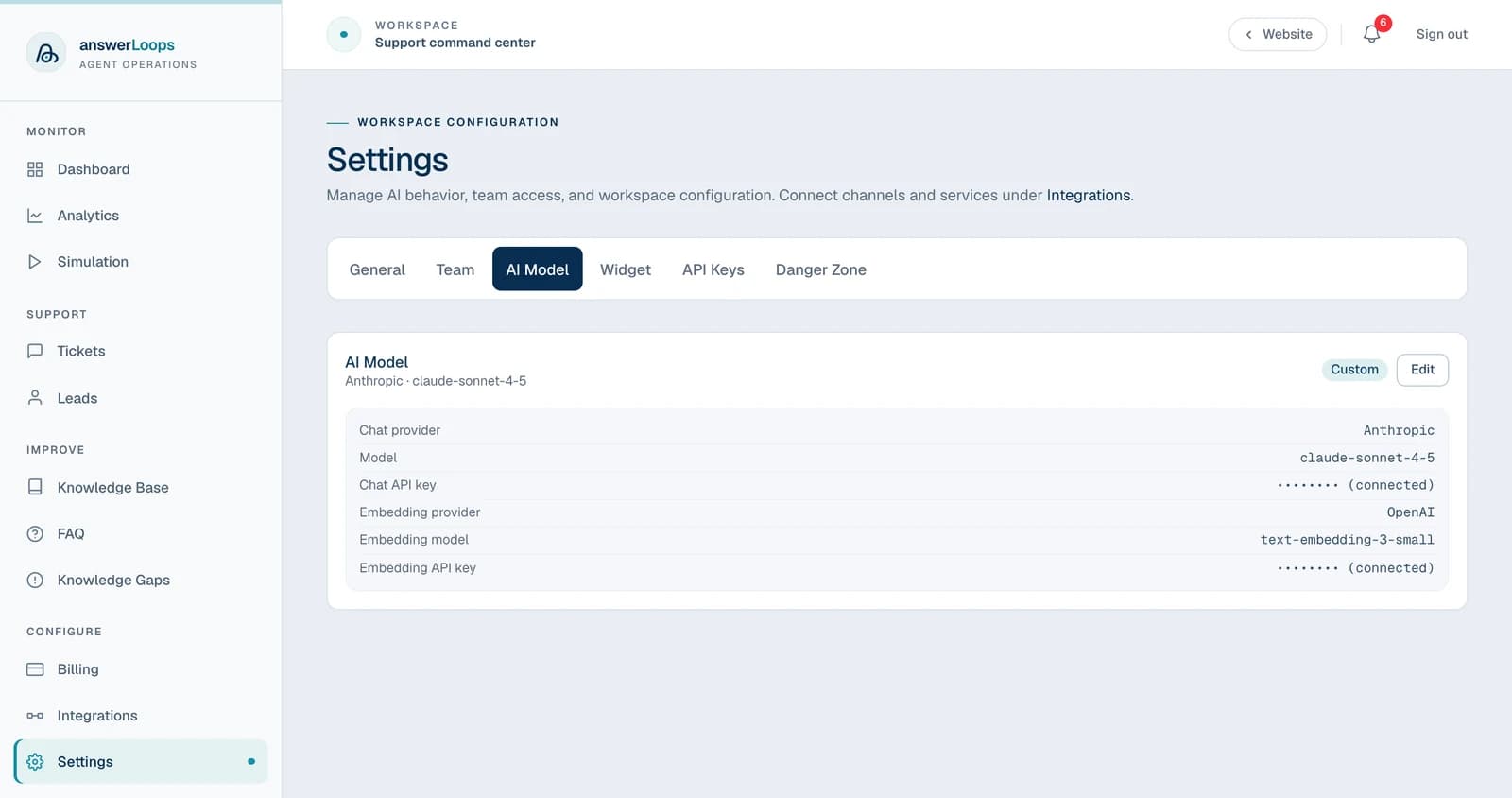
The screenshot shows a demo workspace. Its settings are sample data.
Which setup do I need?
| If you... | Do this |
|---|---|
| Want to start quickly on a hosted plan | Nothing. Included AI usage covers answers and knowledge-base processing, up to a limit. |
| Have an OpenAI key | Use OpenAI for chat. The same key covers embeddings, so one key removes both limits. |
| Prefer Anthropic, Groq, xAI, Google Gemini, or Mistral for answers | Use that provider for chat. Add an OpenAI key under Embeddings to remove the knowledge-base limit; on a hosted plan it is optional. |
| Want to run your own model, such as Ollama, LM Studio, or vLLM | Use an OpenAI-compatible endpoint. This is Custom AI model configuration, included on Enterprise and in the self-hosted edition. |
| Are self-hosting | Set OPENAI_API_KEY in your environment, or save provider settings in this page. See Self-hosted installs. |
What runs by default
| State | What's used |
|---|---|
| A hosted workspace, no key configured | Included AI usage, up to a limit: for the whole trial, then monthly on a paid plan |
| AI limit reached, still no key | That part of AI pauses until you connect a provider, or, on a paid plan, until next month |
| Own chat key from a provider other than OpenAI, no embedding key | Answers on your key; knowledge-base processing on included usage until you add an OpenAI embedding key |
| Self-hosted | The OPENAI_API_KEY in your environment |
| A workspace with saved model settings | Its configured chat and embedding services |
The card at the top of the page shows where you stand: Included, Limit reached, Custom, or Platform default. On included usage, answerLoops chooses the models and the card lists them read-only. See Billing for how the limits work.
Supported providers
| Provider | Chat | Embeddings |
|---|---|---|
| OpenAI | Yes | Yes (the same key covers both) |
| Anthropic | Yes | No embeddings API |
| Google Gemini | Yes | Coming soon |
| Groq | Yes | No embeddings API |
| Mistral | Yes | Coming soon |
| xAI (Grok) | Yes | No embeddings API |
| OpenAI-compatible endpoint | Yes (Enterprise) | Yes (Enterprise) |
Bring-your-own-key with a named provider is included on every plan. The OpenAI-compatible option takes your own base URL (Ollama, LM Studio, vLLM, or a proxy). On the hosted service the base URL must be an https address reachable on the public internet. Self-hosted installs can also use http and addresses on their own network, such as a local Ollama server.
OpenAI is the only provider that can handle knowledge-base processing (embeddings) today. Google Gemini and Mistral are coming soon. Every other provider in the table covers answers only.
If your chat provider is not OpenAI:
- On a hosted plan, the OpenAI key under Embeddings is optional. Leave it blank and knowledge-base processing runs on your plan's included AI usage. Add an OpenAI key to remove that limit.
- On a self-hosted install, enter an OpenAI API key under Embeddings, or use a custom embedding endpoint. Without one, knowledge-base search and every ingest would fail, so the save is rejected with a clear message.
Connect your own provider
Open the form
Go to Settings → AI Model. On first setup the form is already open; if settings are saved, select Edit. Only owners and admins can change these settings.
Choose a chat provider and model
Pick the Chat provider and enter its API key. Then select Refresh models to pull that provider's current model list live, so Model ID shows what the provider offers today. If the live fetch fails, or before you have run it, Model ID falls back to a built-in list of recent models. You can also type an ID directly with Custom model ID…. For xAI (Grok) and OpenAI-compatible endpoints there is no built-in list, so enter the ID yourself or use Refresh models.
Choose an embedding provider and model
Pick the Embedding provider and Embedding model. If the chat provider is not OpenAI, add an OpenAI embedding key (optional on a hosted plan, where leaving it blank uses included AI usage).
Test the connection
Select Test connection. This makes a very small test call to each provider with the values you entered, and nothing is saved yet. It reports chat: connection OK and an embedding line, or a specific error such as a rejected key, an unknown model, or an unreachable endpoint. With no embedding key on a hosted plan, the embedding line says knowledge-base processing will use included AI usage instead.
Save
Select Save on first setup, or Update when you are editing existing settings.
Changing provider later
If you switch the chat or embedding provider and leave the key field blank, the save is rejected, because the stored key belonged to the previous provider and would fail on every call. Enter a key for the new provider. A keyless local endpoint is the exception: switching to the OpenAI-compatible option with no key clears the old one.
Leaving a key field blank when you update the same provider keeps the stored key. The field shows Key saved.
Self-hosted installs
A self-hosted deployment has no included usage, so it needs a key from the start. There are two places to put one.
Set OPENAI_API_KEY in .env and restart the app. Every workspace that has not saved its own key uses it, for both chat and embeddings. It is the quickest way to get answers working.
OPENAI_API_KEY=<your-openai-api-key>OpenAI is the only provider read from the server environment. Reading the Anthropic, Gemini, Groq, Mistral and xAI keys from environment variables is coming soon.
Two things are specific to self-hosting:
- Embedding size. The knowledge base stores 1536-dimension vectors. An OpenAI-compatible embedding endpoint works as long as its model produces vectors of that size; a model with a different size is rejected when an article is saved.
- Re-indexing runs in the bot service. When the embedding model changes, the background re-index is performed by the
botservice, so keep it running. See Production deployment.
To run a model on your own hardware, follow the Ollama guide. It covers the base URL to use when answerLoops runs in Docker. Most local setups keep an OpenAI key for embeddings only.
Reset to the default
Reset to platform default deletes your workspace's AI settings. A hosted workspace falls back to included usage (or, once the limit is reached, to no AI until next month). A self-hosted deployment falls back to its environment key.
If your embedding model changes, either because you switch it here or because answerLoops changes the included one, your knowledge base is re-embedded in the background from what you already added. Search keeps working throughout, and you do not need to re-upload anything.