Skip to content

AI community support from your docs

Every reply in your community channels is drafted from your docs and checked by a second AI.

No card required. Every feature is free for 14 days, with no obligation.

Good answers start with your knowledge.

  1. Question arrives

    From one of your community channels

    Webhook retries made duplicate orders. How do we stop it?Discord · #dev-support
  2. Draft from your docs

    Find relevant knowledge. Write a sourced answer.

    • [1] Webhook delivery
    • [2] Idempotency guide
  3. Check the answer

    A second AI Agent reviews the draft against sources.

    Every step matches a cited source
  4. Reply with confidence

    Your team approves, or auto-reply when enabled.

    Posted with 2 cited sources
Save useful resolutions as knowledge
//issue 372 supported channel

Website chat widget

Add a support chatbot to any website or documentation site

Visitors get answers from the articles you publish, right on the page they’re reading. Paste one snippet into your site and choose which domains it runs on.

  1. A visitor asks a question on your website

    They open the chat bubble on your site or docs. No account or sign-up needed.

  2. answerLoops searches your articles

    Only the knowledge-base articles you publish. Past tickets and internal notes are never used.

  3. The answer appears in the chat right away

    Written in the visitor’s language, with steps, links, or contact options when they help.

Not covered by your articles? The chat offers to take the visitor’s email so your team can follow up. On Pro and Enterprise, the question also lands in your Review queue so you can write the missing article.

Install the website chat widget

Answers are verified before they reach your community

Every answer is written from your docs, then checked against them by a second AI agent before anyone sees it.

  1. A member asks a question in your community

    In Discord, Slack, or another connected channel. answerLoops saves it as a ticket with the full conversation.

  2. answerLoops writes an answer from your docs

    It finds the knowledge-base articles that cover the question and cites them in the reply.

  3. A second AI agent verifies the answer

    The Review agent checks the reply against those same articles and scores how confident it is.

Then your team decides. By default nothing is posted until someone approves, edits, or dismisses the answer. Turn on auto-reply for a channel and only answers the Review agent is confident in post on their own. The rest still come to your team.

See the reply settings

Inside the workspace

Everything your team needs to run community support

One workspace for every channel, from the first question to the article that answers the next one.

Tickets

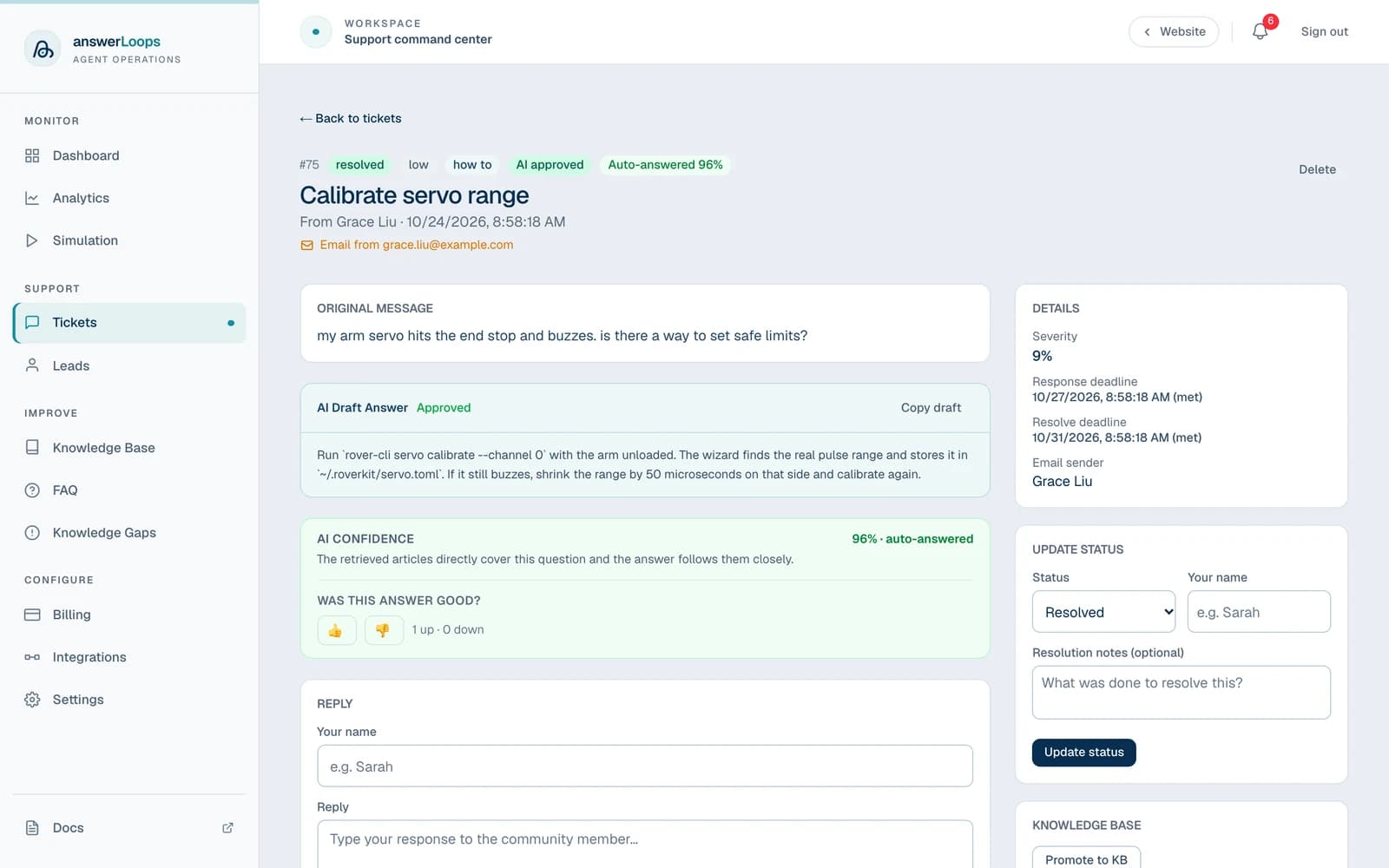
Every conversation becomes a ticket

Each question from Discord, Slack, email, or any connected channel becomes one ticket. It keeps the original message, the AI’s answer and confidence score, every reply, and the response deadline, so your team works from one inbox instead of checking every app.

How tickets work
An auto-answered ticket: the original message, the AI answer marked as approved, a green confidence panel showing 96 percent, and thumbs up and down buttons to rate the answer.

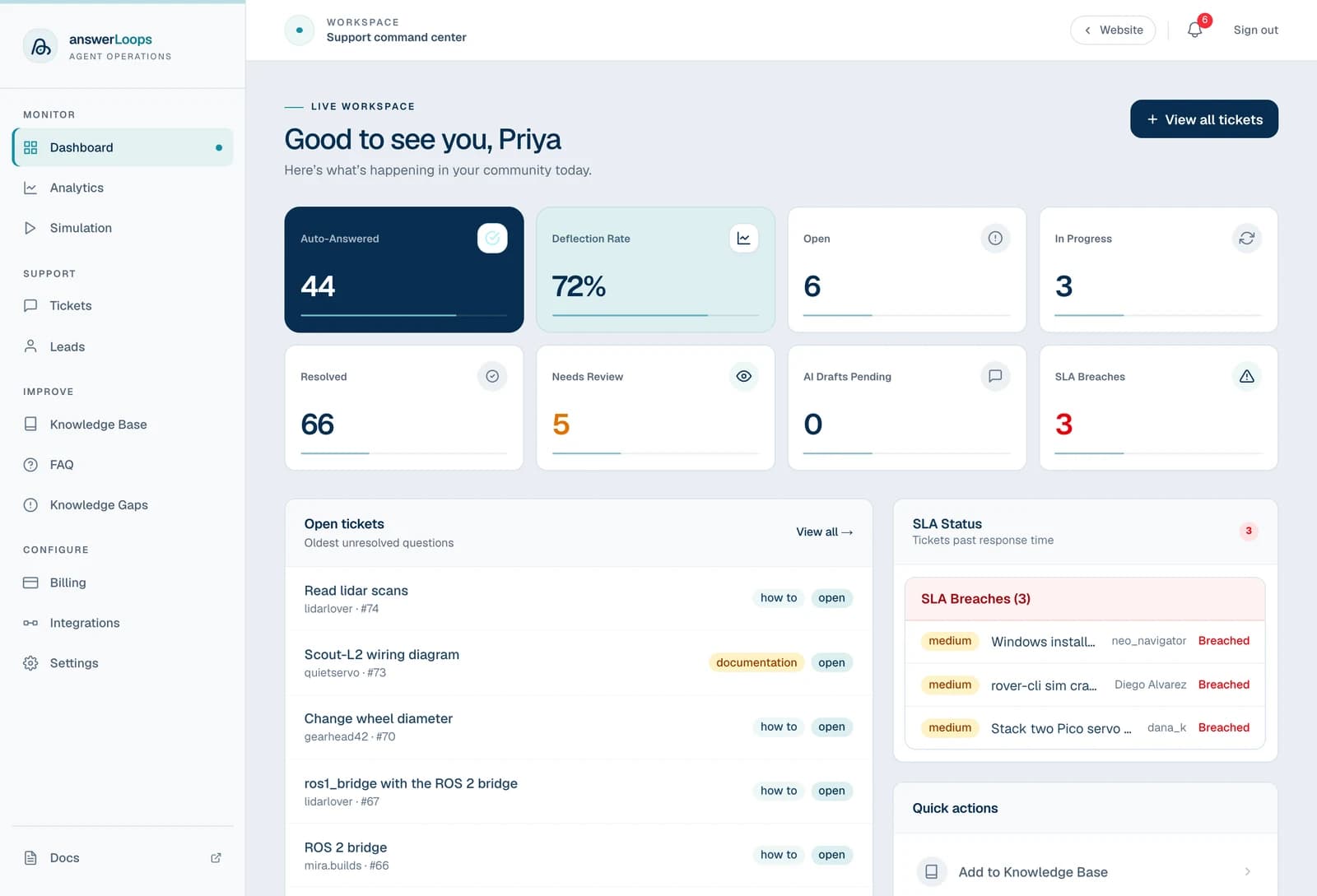
Dashboard and SLAs

See what’s urgent before it’s late

Set response and resolution targets for your team. The dashboard shows what the AI answered on its own, what still needs a person, and every ticket that has missed its target, kept apart from the rest of the queue.

Tour the dashboard
The answerLoops dashboard: ticket counts for auto-answered, open, in progress and resolved tickets, with the open tickets list and SLA status below.

Knowledge gapsPro

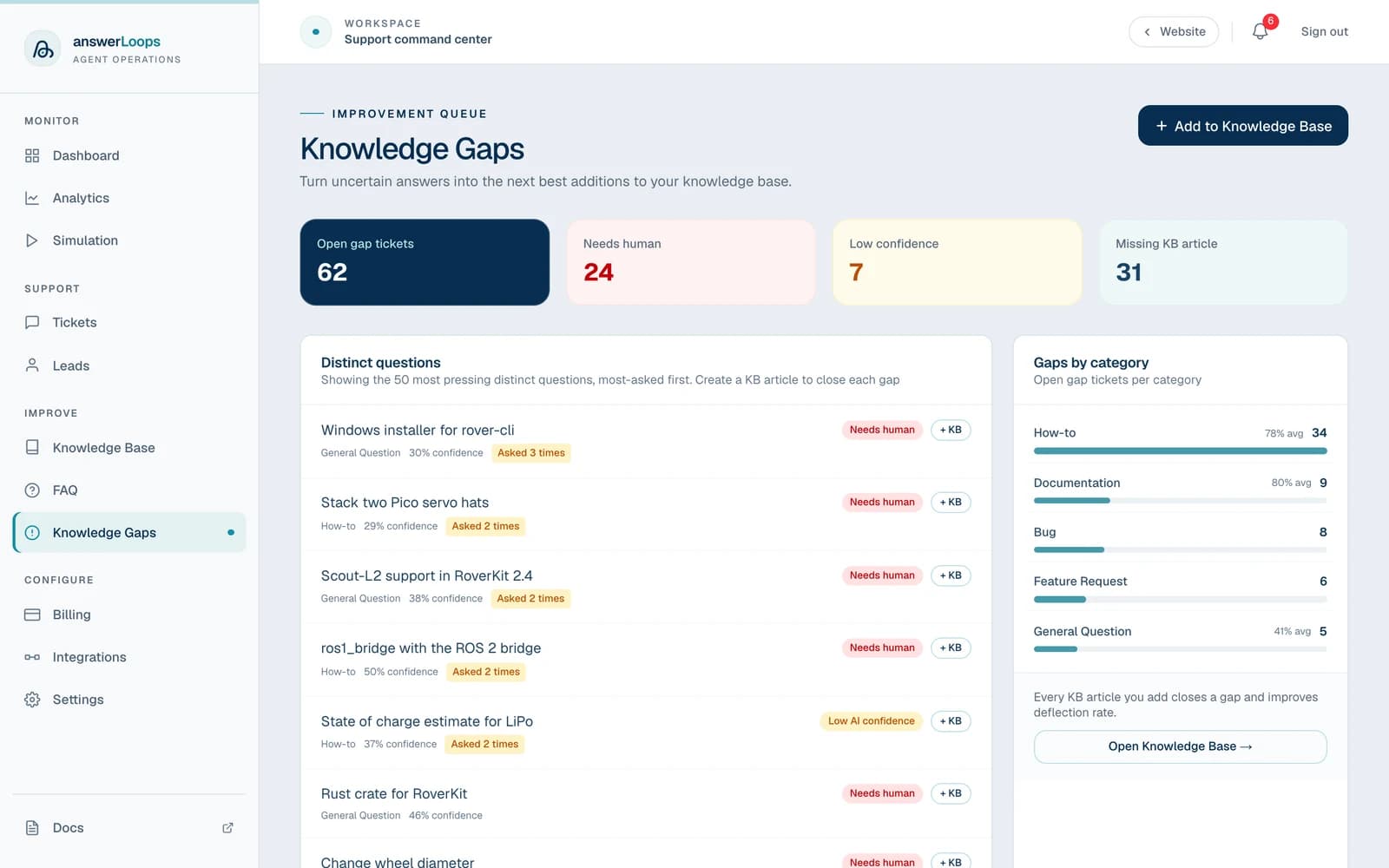
Find the gaps in your docs

See the questions the AI couldn’t answer, most-asked first, and why: it needed a person, it wasn’t confident, or no article covers it. Start the missing article from the question in one click, so the next person gets an answer.

How knowledge gaps work
The knowledge gaps queue: counts of open gap tickets, the most-asked unanswered questions, and a category breakdown.

Analytics

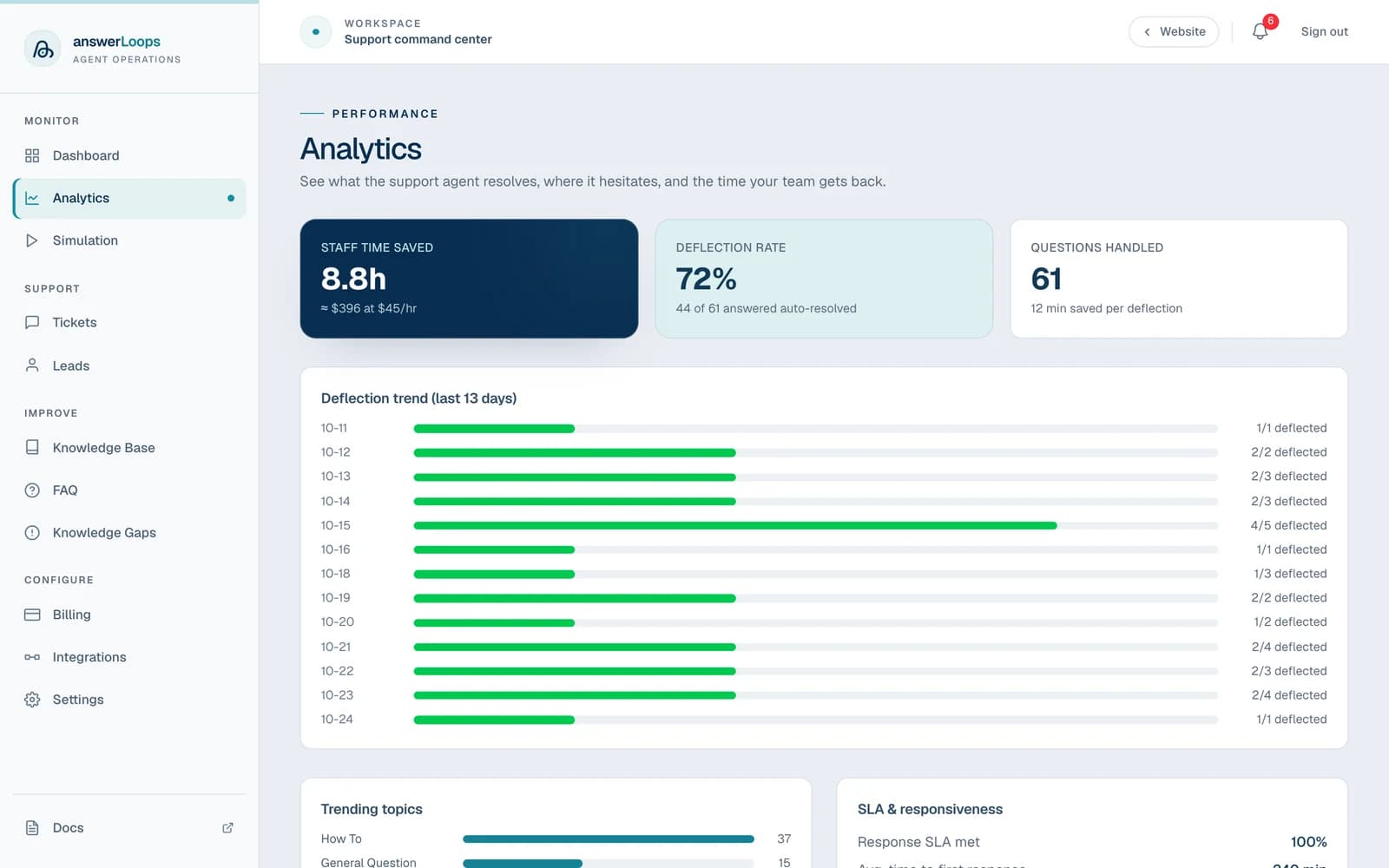
Know what the AI saves you

Track staff time saved, the share of questions the AI resolved on its own, and how that changes day by day. On Pro and Enterprise, see how customers rate the answers too.

Read about analytics
The analytics page: staff time saved, deflection rate and questions handled, above a day-by-day deflection trend.

Try it with your own community

No card required. Every feature is free for 14 days, with no obligation.

Start your free trial

MCP and API access for AI agents

Let AI tools use the same support knowledge

Give coding assistants, internal agents, and custom tools access to the same knowledge and reviewed answers your community uses.

Through MCP or the REST API, an agent can search your docs, prepare an answer, or open a ticket for your team to follow up.

answerLoops / MCPTOOL DIRECTORY
HTTP/api/mcp
↳ search_kb

Find relevant answers in your knowledge base

↳ generate_answer

Generate a source-grounded, reviewed answer

↳ get_faq

Read your latest FAQ

↳ get_tickets

Retrieve support tickets

↳ create_ticket

Hand a question to your support workflow

Available on every hosted plan

Support for any community

If your members ask the same questions and you have docs that answer them, answerLoops fits.

Developer communities

Use your setup guides and troubleshooting docs to answer recurring questions in Discord, Slack, and website chat.

Courses and membership groups

Help students find course instructions and answers in Discord and Circle, with questions that need your attention kept in the team queue.

General-interest communities

Answer questions about community rules, events, and getting started in Discourse and Circle using the guides your moderators maintain.

Art and creative communities

Help members find submission rules, workshop instructions, and print specifications from your community guides.

Crypto and Web3 communities

Answer questions about project documentation, participation rules, and getting started in Telegram and Discord.

Businesses and organizations

Use your service documentation to answer common client questions in email and website chat.

Need a custom setup?

Local or custom models, migration from another support tool, or onboarding help for a larger team.

Before you start

Questions about setup and operation

What does answerLoops do?

answerLoops collects questions from your community channels and drafts replies using your documented knowledge. A separate AI review checks each draft against its sources. You can approve replies yourself or enable automatic replies for individual channels. Useful resolutions can be saved for future questions.

Can I review answers before they are sent?

Yes. Automatic replies are off by default on newly connected channels. Review drafts first, then enable automatic replies for the channels where you want them. Questions that need attention stay in your team’s queue.

What can I use as a knowledge source?

Import documentation pages, upload files, or connect a GitHub repository or Notion workspace. You can also save useful ticket resolutions to the knowledge base.

Do I need an AI provider account?

Hosted plans include AI usage, during your trial and every month after, so you can start without setting anything up. Every question the AI works on uses some of it, including drafts held for your team. That is why each plan lists estimated AI replies: Standard covers roughly 500 a month and higher plans include more, but longer questions and sources use more. AI replies are counted exactly and separately from this usage, so a plan can reach its included AI usage before its AI reply allowance. When that happens, drafting pauses until your usage resets next month (the trial's does not reset), or until you connect your own AI provider. To remove the limit, connect an account with a supported AI service (like Anthropic or OpenAI) and pay that service directly for the usage, separately from your answerLoops subscription.

Can I add the chat widget to my website or docs?

Yes. Add the embed snippet to any website or documentation platform that supports custom JavaScript, and configure its allowed domains in Settings. The widget answers from published knowledge-base articles, and visitors do not need an account.

Is answerLoops only for developer communities?

No. It can use your guides and FAQs to answer questions in art, crypto, course, membership, and general-interest communities, as well as developer communities. The answers depend on the documentation you provide.

How do I onboard an AI agent? (optional)

Start with the agent onboarding guide and connect your AI agent to your answerLoops workspace. Agents that support skills can use answerloops-operate for guided setup. Other compatible AI tools can connect through MCP or the REST API. Create an API key in Settings → API Keys and choose what your agent can access.

Can my own AI agents use answerLoops? (optional)

Yes. Every hosted plan includes MCP and REST API access for searching knowledge, reading FAQs and tickets, generating answers, and creating support tickets. Usage limits depend on your plan.

Get started

Try it with the questions your team gets every week

Add a few support articles and connect a channel, then review the replies before deciding what to automate.

Start your free trial

No card required. Every feature is free for 14 days, with no obligation.

View plans and model costs